Available in 4 languages 🇫🇷 🇬🇧 🇪🇸 🇩🇪
Apple Watch + iPhone

Train hands-free.
Recover smarter.

AutoRest detects when you finish a set and starts your rest timer automatically. No tapping. No interruptions. Just lift.
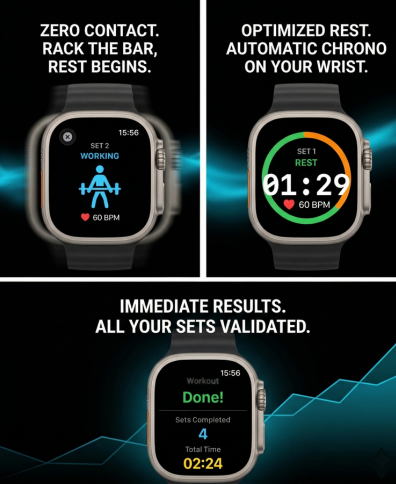
AutoRest Preview

How it works

01

Start your session

Open AutoRest on your Apple Watch and begin your workout.

02

Lift

Perform your set. AutoRest detects when your movement stops using wrist motion analysis.

03

Rest automatically

Your timer starts instantly. Your watch notifies you when to go again.

Precision engineered

Automatic Set Detection

AutoRest analyzes wrist acceleration patterns to detect the exact end of a set and trigger rest automatically. No button press needed.

Custom Rest Durations

Set specific recovery times per exercise, adapted to your training style.

Apple Watch First

Built natively for watchOS for speed, battery efficiency, and seamless gym use.

AutoRest Pro

Unlock advanced pacing, deeper customization, and full control over your recovery. Upgrade from the app anytime.

Simple, honest pricing

Monthly

$1.99/month

Perfect to try Pro

  • Automatic set detection
  • Apple Watch haptics
  • Custom rest durations
  • Smart pacing insights
Best Value

Yearly

$9.99/year

Save 58% vs monthly

  • Automatic set detection
  • Apple Watch haptics
  • Custom rest durations
  • Smart pacing insights

Note: Free version available with core features.

Support & Contact

Privacy Policy

AutoRest is built with a privacy-first mindset. Your workout data and motion signals are processed locally on your devices. We do not sell your personal data.

Read Full Privacy Policy

Why didn't my last set detect?

Make sure your Apple Watch is fitted correctly. Exercises with clear wrist movement work best.

Does it work for bodyweight exercises?

Yes, as long as the movement pattern is distinct enough for the sensors to detect.

How do I restore my Pro purchase?

Go to Settings in the app and tap Restore Purchases using the same Apple ID.